

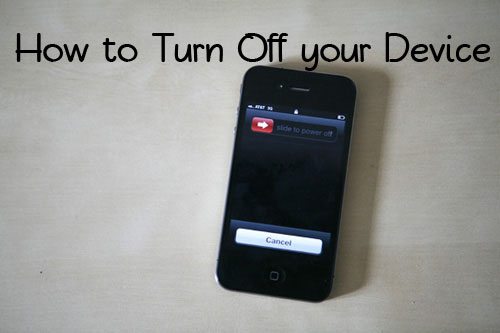

 Yes, you read that title correctly! I am doing an entire how to on turning off your iPhone, iPod Touch and iPad. Why? Two reasons. The first is that I was out to dinner with my girlfriends and one had her Facebook app freeze up on her. She deleted the app but then her iPhone promptly froze up. She asked me what to do about it and I gave her my fallback answer – turn your phone off and back on. Her next question surprised me a little bit – How do I turn it off? Fast forward to about a week later when my husband was going over some technical analytics mumbly jumbly stuff for this website. He told me that a large number of people reach this site through search results for the words “how to turn off iPhone” or something similar. What? I get a huge amount of traffic to my article about shutting down apps but shutting down the phone? I’d never thought about answering that question but apparently there’s a need for some simple instructions. Thinking back I’m not sure how long it took me to finally ask my husband how to turn my phone off in the beginning. I do know there was some pride swallowing involved before I asked. So here goes!
To turn off your iPhone, iPod Touch or iPad the first thing you’ll want to do is find the rectangular button on the top of your device. This is called the Sleep/Wake button. Press down on the button and hold it for a few seconds. If you let it go the only thing you’ve done is made your screen go dark. This is fine if you’re in a movie theater or another place where you need to quickly darken your screen but you haven’t turned off your device. You need to hold down that button until you get a screen with a red arrow at the top and a bar that says “slide to power off”. At the bottom of the screen will be a cancel button. Place your finger on the red arrow and slide your finger to the right. This will shut down your iPhone. As it’s shutting down you’ll see a spinning circle in the middle of your screen. Simple as that!
Now that you’ve turned off your device how do you turn it back on? The answer is to do the exact same thing. Hold down the Sleep/Wake button until the Apple logo appears in the middle of your screen. When you see this you’ll know that the phone is up and running again. Don’t panic if the apple stays there for a moment or two, this is normal. Eventually you’re going to get the “slide to unlock” screen. Go ahead and slide that bar and you’re good to go!
On a side note, turning the iPhone off and then on did fix my friend’s problem. It’s always one of the first things I try whenever my iPhone goes buggy and more often than not it solves the problem. I suppose that’s what makes knowing how to turn the devices off such a good thing! Now in a preemptive strike (the alternative is locking down the comments so she can’t tell on me!) I’ll admit that I did in fact make a funny “shooop” sound as I pushed the button and showed my friend how to slide and then shut the phone down. Yes, I am that cool and I do come with my own sound effects. I can’t seem to adequately explain a technical solution without them!