How To Turn Off Apps

November 8, 2010

When I updated to the iPhone OS 4.0 I knew that it would allow me run apps even while I was using other apps. I thought it would be nice for the apps that send me push notifications to keep working all the time. So I updated the software and went on my merry little way. About a month ago I noticed my iPhone was running through battery life at an alarming rate. I knew something had to be up because my kids hadn’t been using my phone much and that’s usually my guaranteed battery drain. I deleted apps, cleared off my camera roll and the battery life did improve. A little.

On Saturday my husband was looking for something on my iPhone and he discovered that I had at least thirty apps running in the background. He said something to the effect of don’t you know how to turn off apps when you are done using them? I said yes, you just leave the app, tap the home screen button and be done with it. Well….apparently I’ve been delusional because there are many apps that will continue to run even when you’ve left them. Which is fine if they’re apps that need to run but if you have a bunch that don’t then your phone memory and battery life are going to suffer. There was my lightbulb moment of the week.

Perhaps I’m the only one out there who didn’t realize that I had so many apps working overtime for me. Here are the steps to truly shutting down an app – just in case I’m not the only one who didn’t know how to do it.

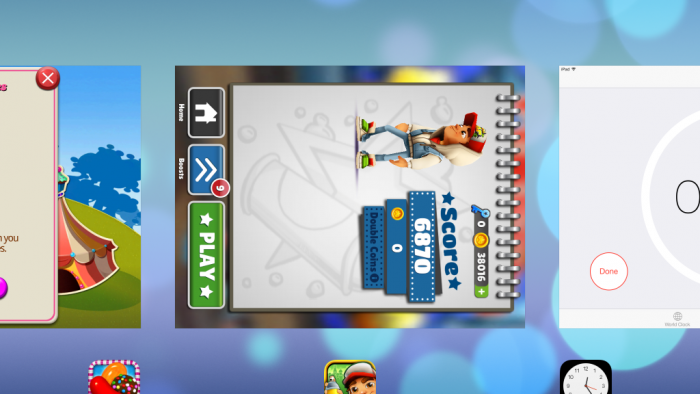
  • Tap the home button twice.
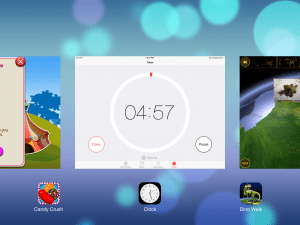
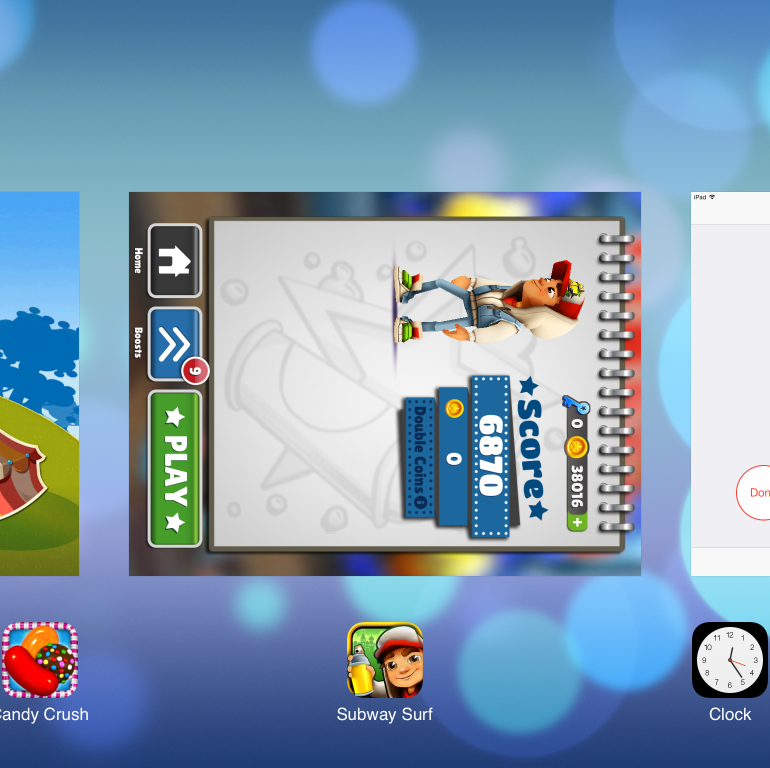
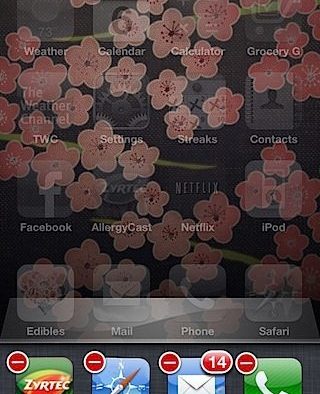
  • At the bottom of the screen you’ll see a row app icons. These are the apps that are running. Slide your finger to move forward or backward through the apps. Chances are you’ll have more than the four that first show up.
  • Touch one of the app icon’s and hold your finger on it until they all start wiggling. A small red circle will appear at the top left of the icon.
  • Tap on the red circle and the app icon will disappear. The app is now no longer running in the background.
  • When you’re done shutting things down tap the home button and the apps will stop wiggling.
  • Tap the home button again to return to your home screen.
  • These steps will work even if you are currently using an app. In other words, you don’t have to be on the home screen to bring up the row of running apps.

Now that I know how to manage them I can (hopefully) make better use of this feature. Go ahead, give it a try and see how many apps you’ve been running in the background!
IMG_1959.jpg
 
Advertisement
Advertisement

Advertisements

149 Responses "How To Turn Off Apps"

  1. By Marion on Nov 8, 2010

    Do you have a bug planted at my house??? I was just muttering about this last night, I have been having lots of problems with crashing apps. I had soooo many open, some I hadn’t used in weeks! Does this affect the push notifications? Why does something need to run in the background anyway?? Thank you for posting this!

  2. By Kim on Nov 8, 2010

    Thanks for this tip! I think that I must have had every single app running in the background!

  3. By Natacha on Nov 8, 2010

    Incredible, thank you for this hot tip!!!! I think ALL my apps were running, I find it quite amazing that my battery lasted so long…

  4. By Kristine on Nov 8, 2010

    Oh. My. Goodness. I think every app on my phone was running in the background. Unbelievable! What are good ones to leave running? And how do you actually quit the app when you exit it, instead of leaving it running?

  5. By Lee on Nov 9, 2010

    Actually this Is not entirely true. The apps listed in the bottom bar are only a list of your recently opened apps. By deleting them all you are inevitably closing an app that wasn’t previously closed properly, thus still running in the background. Make sure to always press the HOME button to ensure an app is closed. A lot of app developers have not yet integrated multitasking into their apps. I hope this helps further clarify multitasking to your readers.

  6. By The iPhone Mom on Nov 9, 2010

    Thanks Lee! I don’t understand all the details of how it works, I appreciate your insight!
    ~Heather

  7. By The iPhone Mom on Nov 9, 2010

    Marion – I asked my husband about this. He said an app like “Trapster” should be kept running in the background. That one gives you notifications when you’re approaching speed traps, construction, etc. I suppose you’d need to keep it running so the GPS worked with the app. Also, sports score apps. I know he’s got one that alerts him when certain teams have scored in a game. It’s mighty annoying on Saturdays. :-)

  8. By The iPhone Mom on Nov 9, 2010

    I think Lee’s comment answers the question – I’m thinking maybe an app does shut down when you hit the home button, but if you’ve switched from one app to another without tapping home it’s left running…

  9. By Ann on Nov 16, 2010

    I was told about this feature when I had my iPhone replaced. I wasn’t sure how the sales person did this, so thank you for the instructions. Very helpful. I couldn’t even fine this on the apple website.

  10. By Joanne on Nov 21, 2010

    I learned of this trick just a couple of weeks ago while visiting an Apple Store in Phoenix. Now I am telling everyone who owns an IPhone.

  11. By claire on Dec 10, 2010

    Does the iPhone not have an app killer like the Droid? Get with the program apple!

  12. By Ally on Dec 21, 2010

    Wow – amazing tip! Thanks! Didn’t realize I had like 20 apps running in the background. I’ll be sharing this one for sure!

  13. By John on Dec 23, 2010

    Many thanks for the info. Couldn’t work out why my battery was running out so fast.

  14. By Jack on Dec 28, 2010

    Thank you for your post. I have been experiencing the exact same problem. Plus, I was always exceeding my monthly data plan and was being charged extra fees by AT&T. Hopefully my battery will now last longer than one day, and my billing will be less. I am upset that AT&T does not share any of this with its customers.

  15. By Paige on Dec 31, 2010

    Wow, EVERY app was running including youtube which I have NEVER used! Wow! Thanks! I am a new follower (and new iphone mom). ;)

  16. By Andrea Holloman on Feb 8, 2011

    You are NOT the only one! I just got my first iPhone YESTERDAY. I have had an iPod touch since the first day they were sold, so my learning curve has been quite short, but tips like these are great.

    BTW, I had 12 apps running. . . .sheesh!

  17. By Hylad on Feb 13, 2011

    Thank u so much! Really made a big difference!

  18. By Darko on Feb 14, 2011

    Thanks so much, my battery life sucked and i couldn’t figure it out. This really helped out.

  19. By ellen on Feb 15, 2011

    When I hit my home button twice I get the camera – can’t find which apps are running? HELP

  20. By The iPhone Mom on Feb 15, 2011

    Which iPhone OS are you using? ~Heather

  21. By csdoty on Feb 18, 2011

    How would anyone ever find out how to do this without an internet search. Apple is very bad at telling us how to use their devices.

  22. By Karin on Feb 23, 2011

    Thanks for the tip. I always press the Home button when I’m leaving apps and I had over 20 apps running in the background (mostly my camera and post processing apps), so I don’t think pressing the Home button works. I did wonder why one of my apps kept warning me that I was running too many apps (huh, I’m only running you, what are you talking about app?).

    Thanks again, will definitely be sharing this one!

  23. By lisa on Feb 24, 2011

    new iphone mom, had ALL the apps running (from checking them out!) thanks for the tip!!! keep them coming:)

  24. By Donna on Mar 7, 2011

    Oh my thanks for the tip. I had 56 apps running and could not figure out why this phone was dying so early in day – like 10 am after charging all night. Now I know. Too bad they don’t tell you that when you buy the phone….Hope this fixs the problem. BTW any suggestions on making the ring tone louder than it is – mine is a bit weak???

  25. By Me on Mar 15, 2011

    I don’t think just hitting the home button closes them. My daugther was doing this when she first got her phone. Not a week into having it she received the dreaded text that she was nearing 50% of her data usage and then immediately received another she was over. She was so upset. She couldn’t figure out what she was doing wrong. We called AT&T and they said she must be using face time to use that that quickly. I told the guy she didn’t even know what that was yet. We looked at her usage oneline and found her phone was using data all night when she was in not awake. He said it must be fautly. We took it into the AT&T store and the lady asked what apps we had open. I said none and she has only used 3 or 4. She took the phone and said I can see which ones – handed the phone back and showed us all the apps open. She then showed us how to close them with the instructions above. Arghhhhhh…..The AT&T customer service on the phone could not even figure it out. Now I tell everyone so they don’t have the extra expense we had.

  26. By Braden on Mar 16, 2011

    To eliminate one step, instead of pressing the ‘home’ button when you’re done shutting down apps, you can just press the area above that is grayed out. That will stop the apps from wiggling and bring you back to what you were viewing in one step.
    Also, to add to what Lee said, some app developers haven’t updated their apps to support the multitasking feature, which means if you are not closing out of it on purpose for switching back quickly, it might not do any good because it’s the same as opening it from your home screen. Although this is much less of an issue now, 4 months since Lee posted.
    A few things to remember:
    As most of you know, the battery usage depends on the app. Notepad would use very little, but things that use data or have a lot of graphics, like Youtube or Angry birds use a lot. Same applies with the multitasking feature.
    This feature is useless if you’re always closing all of your apps. So, if you’re using an iPhone 3Gs, I’d keep no more than 5 apps running in the background, give or take, to maintain a decent battery life. If you’re using an iPhone 4, which is more powerful and has a better battery life, you can use somewhere in the 8-10 range, but I’d still stick with around 5. How many different apps do you really need access to all that frequently and quickly?
    I know this is an old post, but I hope this additional info helps. I need to send my in-laws to this site. They just got iPhones this week and have been calling me constantly :)

  27. By The iPhone Mom on Mar 16, 2011

    Great comment Braden! I had no idea what the gray line was for. ~Heather

  28. By Ron on Apr 5, 2011

    I have a 3G and this double click thing doesn’t work on my phone. After I finish an app I always click the home button. I opened an app to check to see if I could just simply go to another app but it won’t let me. The reason for the experiment is because my camera shutter won’t open again. The last time this happened, I sync the phone and that worked. This time no.?????

  29. By ellen on Apr 10, 2011

    I am running OS 4 too but if I click my Home button twice, I get my camera. Not sure why?

  30. By linny on Apr 12, 2011

    WOW THANKS FOR THAT I WAS WONDERING WHY MY BATTERY LIFE WAS GETTING LESS AND LESS THANKS IVE LEARNT SOMETHING NEW X

  31. By Roxy on Apr 29, 2011

    Thanks for the advice, although like other people when I press my home button that screen does not come up… what do people have their Home button click twice set to? If you go to Settings> General> Home Button> Double click home button for: ?? What is yours set to? Help! xx

  32. By Lydia on May 6, 2011

    Thank you so much for the help, i just got my iphone a couple days ago and already had to charge it twice! I hope this helps out….i had every one of my apps running!!

  33. By James White on May 8, 2011

    With respect, you haven’t quite got this right. When you close an app on your iPhone, it’s not actually running in the background in the way that a program does on your computer, or even on some other smartphones. Apple knew that this would be a huge battery drain, and chose not to allow it on the iPhone. You’re right that in the newest release of the operating system, Apple introduced a kind of multitasking, but it doesn’t work the way you think it does (and doesn’t affect your battery life the way you think it does)

    When you close an app, the iPhone “freezes” its state by saving a small file describing the state the app was in when it was closed. it differs from app to app, but can include things like open pages, what part of the app you’re in, text you’ve entered, where you’re up to in game, or whatever. Having saved this, the app closes. It doesn’t continue to run in the background. When you start that app again, it accesses the saved file and (if the app is written properly) starts again in the same place you left it.

    Those apps you see when you double tap the home button are not running – they’re simply apps that have a saved state. if you close them, all you are doing is deleting the saved state. So when you open them again, you will start the app from the beginning.

    Most importantly, this process has nothing to do with notifications. You will continue to receive notifications even if you have “closed” an app in the way you describe – notifications don’t require an app to be open or even suspended. So I’m afraid that doing this won’t have any impact on your battery drain. If you’re having battery issues, there will be something else at fault. In particular, check how often the phone is set to fetch data. having this set too frequently is a common culprit.

    Enjoy for iPhones, ladies!

  34. By jacob on May 8, 2011

    Are ya’ll sure that this is not simply clearing out the list of most recently used apps and not in fact displaying/deleting apps running in background??????????????????

  35. By Strype on May 9, 2011

    Also if you will turn 3G off (settings/general/network) when not downloading anything it will double your battery life. I’ve had my iphone for over a year and didn’t know about the app thing til about 2 days ago when my battery started dying.

  36. By robert on May 22, 2011

    as a new comer to the world of the iphone,thank you.

  37. By J. Grifffith on May 25, 2011

    Thanks, the double tap worked and the apps shut down when I tapped the red circle. Now, let’s see how long the battery lasts. When I first got the phone (Verizon I4), the battery would last all day. Last week or so, It’s been dying by noon. Hope this helps. Thank again.

  38. By The iPhone Mom on May 27, 2011

    James – Thanks so much for your comment and explaining how the Apple multitasking works. Another post recently came out in LifeHacker, quoting the NY times, supporting the fact that even though apps are suspended the multi-tasking does affect battery life. http://lifehac.kr/lbopLS
    I just can’t deny the fact that when I clear out the “suspended” apps my battery life dramatically improves. It happens every time.
    I also wonder how apps like Shopkick and SpeedTrap operate in a suspended state…or are they in fact truly running in the backgroun? Thoughts anyone?

  39. By The iPhone Mom on May 27, 2011

    Roxy – Did you get this solved? I’m wondering what OS you are using – Heather

  40. By The iPhone Mom on May 27, 2011

    Ron – Have you tried shutting your iPhone completely off? Or letting the battery drain and then charging from scratch again? Then syncing? Just a few thoughts. Heather

  41. By The iPhone Mom on May 27, 2011

    Jacob – I’m not quite sure what you’re asking. What I talk about in my post is closing out the apps that are running in the background and taking up battery life. Does that clarify? Heather

  42. By Carld on May 28, 2011

    Doesnt work on Iphone 3G. Unless someone can prove me wrong…!!

  43. By Cindi on Jun 12, 2011

    Thanks to all who have posted here…I have spent days on the phone with Apple and AT&T and no one seems to be able to figure out why my son has gone over his data limits in 9 days! I found that EVERY one of his apps were “open” at the bottom of the screen when I pushed the home button twice. I sure hope that this was the problem since the apps that were open included You Tube and Safari just to name a couple out of the 50+. Thanks again to all of you smart people out there…we sure need you!

  44. By slpete42 on Jun 18, 2011

    Thanks. Like others, I had the full house of all apps open. Long have worried about this, found your indication on what to do because I couldn’t turn off the darn interval meditation chime. Tranqullity now.

  45. By Kim on Jun 19, 2011

    An 11 yr old taught me this trick, but it still takes way too much time to close all the apps. Why not have one button to push to get them all at once? (like the Droid)

  46. By Minal on Jun 23, 2011

    true.. many people dont know of it …thanks for the post !!

  47. By Mary the OINKteller on Jun 26, 2011

    Thanks very much! You saved my battery and me from being ridiculed by my tech-savvy husband who has shown me more than once how to shut off apps. ;)

  48. By Nik on Jun 27, 2011

    Thanks! I love my new iphone and your website! I told my son and husband about this- now they think I’m the smart one! Thanks

  49. By Grace on Jul 9, 2011

    Wow, thanks so much for walking me through that! I had every app running and didn’t even know it! It’s good to know how to turn off the apps to save data usage, especially since I just lowered my data plan. Thanks Again!

  50. By PB on Jul 14, 2011

    Awesome…the battery drain was driving me nuts until I saw your post. I had every single app open! Thank for the instructions.

  51. By George on Jul 15, 2011

    Wow!!! Thanks so much. Great article! (Battery) life saver!

  52. By Carol on Jul 15, 2011

    Re #33 comment– I am confused, if the apps are not actually running, why do they drain the battery? The guy at the Apple store told me the same thing as what iphone mom says here. Closing the apps has been a lifesaver for me.

  53. By Sherry on Jul 19, 2011

    Thank you for the info!!

  54. By MAO on Jul 22, 2011

    Thanks a lot for the info!!! You have no idea how many i found running in the background… i started switching them off last week…. just finished! LOL

  55. By Patrick on Aug 4, 2011

    Thanks for the tips by the way. I always wondering what make my Iphone battery dying like fish don’t have water. Now, I figured out why.

  56. By GrannieTheGeek on Aug 5, 2011

    I was having the same problem. It started when my grandson -who was visiting for a week – was playing with his storybook and game apps. All those apps were still open and conceivably running. I just turned them off. Thank you so much. :)

  57. By JTS on Aug 9, 2011

    THANK You!! You easy instructions saved my battery life!! I should have read the iPhone manual, but who has time for that!

  58. By antonia on Aug 14, 2011

    James White’s comment above describes just how this is *supposed* to work. The background apps go into suspension without any drain on battery or system. The only thing I can think is happening is that the some of the apps, somehow, are doing Internet fetching or using system resources, in the background. In addition, the iPhone (or Ipod Touch) is still having to monitor and keep track of the suspended apps, which takes resources and eat up memory and battery life.

    There’s a good blog post on this http://lifehacker.com/5806346/extend-your-iphones-battery-life-by-quitting-apps-in-the-multitasking-queue

    There’s also an article by PC Magazine that confirms iPhoneMom’s take on this– and provides plenty of other tips about ways to save battery life. http://www.pcmag.com/article2/0,2817,2367391,00.asp

    See David Pogue’s column in the New York Times on this, too. The comments on his columns usually prove worthwhile to read as well.

    http://pogue.blogs.nytimes.com/2011/05/23/four-ways-to-make-your-battery-last-longer/

    My take on this is to every now and then (every few days) go in and quit the previously used apps. Don’t be compulsive about it. Plus, leaving ones there that you use a lot is a good idea–it makes them open instantly and returns you to wherever you were– and that’s often a real advantage.
    ———————————————-

    By the way, much thanks for the promo code for 2Do by Day! I’m looking forward to trying it out. In the meantime, though, I have too many to dos to do! :-) (Which is why I’m reading your site rather than doing today’s tasks! :-) )

  59. By Joe on Aug 21, 2011

    Thank you for this posting. Just bought an I Phone 4 last week and a friend told me to make sure I turn off the apps, but I couldn’t figure out how to do anything but delete the. Appreciate your simple instructions on how to accomplish this task and save the battery life of the phone.

  60. By Rachel on Sep 12, 2011

    Great tip – easy to follow your steps. Thanks for sharing!

  61. By Nicki on Sep 12, 2011

    thank you, brilliant advice, every app that was loaded was running in the background, no wonder my battery was running down within 3 hours!

  62. By Sanjeev on Sep 24, 2011

    Dear mom
    Realy it was a nice informaion, so that I could save my phone+Battery+Data usage, altogether.
    I was really not aware of such fact, even though using I-phone4 since months.
    Thanks a lot.

  63. By AMurdock on Oct 7, 2011

    Thank you Thank you Thank you. I can not believe how much was running on my iphone.

  64. By iPAD Newbie on Oct 12, 2011

    Thank you. I first thought once you exit the app, it’s already off. No wonder my battery drains faster even though the device is on sleep. :)

  65. By Allen on Oct 13, 2011

    I had NO IDEA! I’ve had my phone for almost a year – literally every single app on my phone was on that list. My battery should last longer than 16 hours now! :) Thanks!

  66. By Travis on Oct 14, 2011

    Thank you very much for the answer. I had looked around google a bit but this is the page that actually answered my question about how to properly shut them down.

    Cheers

  67. By Megan on Oct 15, 2011

    Oh my goodness!! Thank you so much!! I have just switched from blackberry to iphone 4s and I’m in love with it! and of course i have been playing with it since i got it! and thought that’s why my battery life was draining but thought i’m probably not shutting everything down properly. I had 12 apps running! ha ha thank you so much for your advice and this site!!

  68. By Nico on Oct 19, 2011

    Good job at telling perfect ******. Yes the iPhone 4 keeps the apps open in order to open them faster the next time you use them. Anyway they are in perfect standby mode and dont use up any ressources. Horrible post… Horrible comments…

    Quote from Apple Wesite: (http://support.apple.com/kb/ht4211)
    “Multitasking in iOS allows you to switch instantly between apps and to resume an app. When you return to an app, you can pick up right where you left off. Multitasking doesn’t slow down the performance of the foreground app or drain battery life unnecessarily.”

  69. By The iPhone Mom on Oct 19, 2011

    Nico – Thank you for your comment. I understand how the multitasking works and it’s a wonderful thing to be able to pick up right where I left off. I’m grateful to be able to do it. I also know from my experience that my battery does drain faster when I have multiple apps on. Not a few apps, then I’m okay, but when there are more than ten or so running in the background I notice a definite drain. And if my kids have had a hold of my phone then forget about it. You can count on at least thirty apps running in the background. I’m not sure Apple anticipated the kid factor when they set up multitasking. Just a thought.

    I appreciate your opinion but this is a family friendly site so I edited the language of your comment. I try to keep things positive on the site but I did leave the general feeling of your comment alone because I don’t like to edit my readers.

    You can see Antonio’s comment below for some supporting links on this issue.

  70. By pretzelogic on Oct 19, 2011

    Nico, just because support.apple tells you something doesn’t mean its true…I only know what actually happens…open apps = battery drain. Plain & simple.

    Thank you iPhone Mom…keep up the good work! :)

  71. By Susanna B. on Oct 24, 2011

    I had just installed an incredible app, Naturescapes, on my 2 week old Ipad 2. When I hit the Home button the app kept running, bird chirps and all. Nothing I did would turn it off besides completely shutting down the Ipad. It even played the sounds while in Sleep! Thats when I did the search that brought me here. Regardless of how things are “supposed” to work according to Apple, I have already seen a dramatic difference in my battery life just since the beginning of the article when I shut down the 30 or so apps I had running. Whatever the true culprit, my Ipad started with incredible battery power and in the passed few days it was draining like crazy. It has gone down by even 1% since I shut the apps down. I will be sharing this with everyone I know and cannot tell you how
    Ucky I feel to have come across this! Thank you SO much. Truly!

  72. By Susanna B. on Oct 24, 2011

    Oops, I mean LUCKY to have come across tis. Not ucky. My bad. Lol.

  73. By Pam B on Oct 26, 2011

    Thank you so much for this information. I have had my iPhone for over a year and NOBODY told me this! I just got charged an additional data charge and when I called AT&T, they didn’t tell me this! This was a big help! Thanks again!!!! :)

  74. By Havilah on Oct 28, 2011

    These tips are very much appreciated as it sometimes seems the representatives aren’t always aware of the reality of using something. they just have the basic knowledge needed to SELL the phone. I’m so glad I found this info.

  75. By km on Nov 1, 2011

    “What do you think???”

    What I think is most people have no idea what they’re talking about. The list is NOT a list of apps running in the background. Some of them *MAY* be running but they are not *ALL* running.

    Here, try some facts for a refreshing change

    https://discussions.apple.com/thread/2490805?start=0&tstart=0

  76. By deedum on Nov 6, 2011

    thanks imom for the tip. my sig other just got her first iphone4 and i upgraded from the 3g to 4gs. the at&t lady told us about the app trick (i had 30 apps open) but i am not certain this would have solved my problem, which was that my iphone3 was suddenly going into freeze mode. she explained that since i upgraded itunes to the new operating system the iphone3 processor can’t handle it all. i suppose i could have reset my i3 and continued on my merry way…but it was hard to say no to a new phone. looking forward to learning new tricks on your site.

  77. By AHLondon on Nov 6, 2011

    I’d wondered about this, but never had the time to figure it out on my own. Many thanks.

  78. By T_ CON on Nov 7, 2011

    Thanks mom for this helpful tip. I actually was looking for something else and stumbled upon your tip…which approved to be very helpful, Thanks again.

  79. By evelyn on Nov 10, 2011

    just download a free app called advanced task killer and this app turns off all your running apps and saves your battery life to hope this works for you it has for me

  80. By HMG57 on Nov 10, 2011

    At last…some advice that is easy to understand and that works! If only the apple manuals were so helpful….hmmm

  81. By golfnut on Nov 11, 2011

    I was told by O2 support guy that Apps running in the backgrounds could use up data allowance.So he gave the samea advice double tap home button and shut off running Apps. So is he right or wrong as comments one here seem to suggest he is incorrect

  82. By The iPhone Mom on Nov 11, 2011

    Everything I’ve experienced tells me he’s correct and it seems most people have the same experience. My advice, if your battery is draining, double tap and shut them down.

  83. By Nisha on Nov 22, 2011

    Thank you SOOOOOOOO SOOOOOOOO much. I recently switched from BB to an iphone and was not happy with how frequently I have to charge my phone. And on top of that i was using my data like crazy. Thank you thank you thank you. You are a life saver. I will have to share these little tricks with my husband.

  84. By Nisha on Nov 22, 2011

    And oh i forgot to add that I had called At&t MANY MANY times and they could not tell me why I was going over my data. I was using my iphone the same way as I used my previous BB and i never went over my data then. So, thank you so much!

  85. By Nisha on Nov 22, 2011

    Quick question: were do I go to ask a question if I have one regarding my iphone?

  86. By Heather Leister on Nov 22, 2011

    A question for Apple or a question for me? You can email me – mom(at)theiphonemom.com and I’ll do my best to answer. Or you can try the help forums at Apple.com.

  87. By Nisha on Nov 23, 2011

    Thank you. Will email you shortly. And the question is for you regarding the iphone…..hope you know the answer. Thank you.

  88. By Dave on Nov 26, 2011

    There are some nay-sayers here who seem to “swear” that the apps are in suspended animation. I had just downloaded an app called “System Status” by Jiri Techet to help me look at my whole system. On the very first look, I saw apps using the CPU that I hadn’t opened in a few days on my iphone 4s. And I don’t believe they can be using the CPU and NOT also using the battery. That’s when I started searching and found this page to shut down app’s. Regardless of whether it’s a developer problem or an OS problem (that’s above my pay-grade), I’m shutting them down and fully expect better battery life because of it.

    Thanks, Mom!

  89. By Jennifer on Nov 26, 2011

    Thank u so much I was at 100% data every day hopfully this stops thanks to this article

  90. By Gary on Nov 27, 2011

    Thanks so much from Sydney, Australia.

  91. By Rebecca on Nov 27, 2011

    This is incorrect. Double clicking home simply displays the last apps you used. Removing them from this “quick launch” bad does not turn them off.

  92. By Stacey on Nov 30, 2011

    So if you do not close these app’s will your data keep running all night on some of them like the situation in post 25? We are flying through data and at this rate I’ll be paying more than a forture before long.

  93. By Jen on Dec 6, 2011

    I just turned off all the apps by double clicking. Thanks for the tip. A salesperson in Best Buy showed me this but I couldn’t remember how she did it. I guess I could turn cellular data back on but I think I’m better off leaving it disabled for now.

  94. By Nicolw on Dec 12, 2011

    I went looking for how to shut down apps on my iPad (knowing from phones how the software works, have to turn off the apps somehow). However, you saved me because I could NOT find the instruction in my iPad quick start manual, on the apple site or this free iPad user guide I downloaded on iBooks. Seriously, you saved me, cause apple didn’t think it important enough to put in their basic manual!

  95. By Amulet on Dec 12, 2011

    Jeeze Apple, why the big secret hiding spot for running apps??? And thank you iphone Mom for sharing this with the rest of us. Thank that hubby of yours too :)

  96. By MrBlackPoplar on Dec 14, 2011

    Wow – eye-opener! Been having loads of problems with my IPhone, and I think this will help quite a bit. (We’ll see!)

  97. By Nicola on Dec 16, 2011

    I went into a store and they said yes it does keep running, therefore draining battery life and also using a load of data. My dad is pre paid on an iPhone and never uses Internet but his credit ran out in 10 days and he had made 3 calls and 5 texts- calls to the same network which means they’re free. After doing this he has. It wasted any credit on data which he is not using!

  98. By Aman on Dec 17, 2011

    Thank you so much, I was having such trouble with this, since 30 apps were running at the same time.

  99. By Barb on Dec 18, 2011

    WOW! I am no even a mom, but I found this and it has been a (battery) lifesaver! Thanks!

  100. By stavros on Dec 22, 2011

    hi, is there a way to turn app’s off on an iphone 3?

  101. By Theresa on Dec 23, 2011

    Thank you so much! I had every single app running! There were some I haven’t opened in months!
    If it was the case that it was the most frequently used apps it wouldn’t be
    every single app! I’m so grateful I just happen to stumble on your site!
    Thank you!

  102. By Joanne on Dec 27, 2011

    I want to shut down my apps on my 3GS, but like some other posters, hitting the Home button twice brings up something else – in my case, the search function. Any tips on why the 3GS is functioning differently or what to do?

  103. By Heather Leister on Dec 27, 2011

    Hmmm – I don’t have my old 3GS with me to test out at the moment but I seem to remember that you could change the function of the Home button. Does that sound familiar? Check the General Settings to see if that’s the case. I found a link that shows you should be able to double tap the home button to pull up the multitasking apps, I believe it only works if you’ve got iOS 4 installed though.
    http://manuals.info.apple.com/en_US/iphone_3gs_finger_tips.pdf

    Anyone out there with a 3GS figure this out? I’d definitely check the General Settings first….when I get home and have my old one in front of me I’ll take a look again. ~ Heather

  104. By Sora on Jan 4, 2012

    So helpful! Thanks so much!

  105. By Jessica on Jan 5, 2012

    The double tap on my phone will not work either, AND when I connect it to itunes it does not upgrade to icloud or iOS 4,..and suggestions on how to turn off these background apps??

  106. By Toilesomedovve on Jan 5, 2012

    Incredibly helpful. I suspected that my apps must run in the background, so I searched the internet for a “kill apps” app like android phones have. What I found is the “arrogance” of the genius that was Steve Jobs. Apple’s approach to multitasking was that you shouldn’t have any problems with memory/battery when running applications. Steve Jobs allegedly implied that the requirement of a task manager (i.e. “kill apps” app)means that the phone has failed. So the question to this forum is, did the iPhone fail in this aspect or all those apps that appear to be running in the background are indeed not affecting the battery life or data consumption or op sys efficiency and we truly do not need to close them? Only Apple knows :-)

  107. By The Blue Flash on Jan 9, 2012

    Awesome, thank you whoever you are!

  108. By Michael Shaw on Jan 10, 2012

    THANKS soso much cant tell u how much better my bat is now, and usage much better to.

  109. By Reader on Jan 12, 2012

    This is an interesting read – and also entirely wrong.

    http://speirs.org/blog/2012/1/2/misconceptions-about-ios-multitasking.html

    Speirs is an expert in this – do your readers a solid and report this.

  110. By Heather Leister on Jan 12, 2012

    Thanks for sharing, interesting read and I learned a few things. I’m definitely not an expert in the field and I’ll never claim to know anything about the technical side of how the apps and iOS all work together. All I know is from my personal experience my devices run better after I manually shut down the recently used apps. My number might be on the high end (usually around 30) because my kids use them and they seem to hit every app they can. I think it’s great that we can have an open discussion in these comments where everyone can present their own viewpoints and experiences. This is certainly a well debated topic!

  111. By Mandie81 on Jan 13, 2012

    This was very helpful. Thanks a BUNCH…..

  112. By Carol Baker on Jan 16, 2012

    I had over 50 apps running!

  113. By Heidi on Jan 18, 2012

    Incredibly helpful. I was killing my battery and had gone over on my data usage without even realizing it. Why is it not more obvious how to shut down apps fully? This boggles the mind.

  114. By tony on Jan 22, 2012

    i have the iphone 3g and i am sure it has over 100 apps running but i cant close them , double taping home dosent work and in setting you cant change it to closeing apps … i need to close them my iphone dosent last 2 hours

  115. By michael on Jan 27, 2012

    appatently whats in the list doesnt necessarilymeen the app us rubbing in the background sumply is another way to your app

  116. By Heather Leister on Jan 28, 2012

    I haven’t been able to figure this out yet…Anyone else have any insight??

  117. By Jman on Jan 29, 2012

    There is a difference between “Applications” and “Background Services”. When an application is running it may start some background services, and when put into suspend-mode (when you depress the home button) the background services may continue to run. Background services are essentially what makes iOS appear to multi-task, performing background processes like GPS ie: location services; or pinging your mail service. “Quitting” the applications should (hopefully) stop the background services associated with the application, so “quitting” any applications you’re not actively using can reduce battery consumption. A power-off might(?) also stop un-needed background services; HOWEVER, not all applications use any background services, so it may be fine to leave those applications in suspend anyway.

  118. By Reggie on Jan 29, 2012

    Thanks. I just checked my Verizon data useage and it was HUGE. My wife has very few apps on her phone and her data useage was minimal. I was nowhere near my monthly maximum but still….I’ve turned nearly everything off. It will turn on as soon as I select it but I can always turn it off after I use it.

  119. By tom wood on Jan 31, 2012

    Thanks!!!! Very helpful!

  120. By Kathy on Jan 31, 2012

    Awesome information! I had lots and lots of running apps.

  121. By AlanM on Feb 2, 2012

    Thank you so much, I was wondering how to find out what was running.

  122. By Heather on Feb 3, 2012

    Another bit to add to this. When you close safari with this method, it does not close any of the open windows. You need to click ont the little page on the bottom right. It makes you Internet page or pages smaller, then gives an x on each so you can close down each page. I am guessing by leaving 8 safari pages open all the time, that is why my battery was needing to be charged twice a day.

  123. By Duchess on Feb 10, 2012

    how about the iphone3g? when i double-click the home button, it goes somewhere like ipod,phone favorites,home? how can I erase all the history ? HELP.tnx

  124. By Darrell on Feb 26, 2012

    Thank you so much for the education my battary was not lasting 48 hours I thought my Iphone was dieing— YOU SAVED ITS LIFE

  125. By I.F. on Mar 1, 2012

    Great advice….thought my apps were closed……iphone mom..lol…

  126. By jim on Mar 3, 2012

    This not true, closing all apps do not really expand your battery life. If you really want a longer battery lifespan and battery life for your iPad check this apple website http://www.apple.com/batteries/ipad.html

  127. By Corey on Mar 4, 2012

    Heather – After reading your original post and subsequent comments, it occurs to me you answer the same comments over and over again from goofballs like “jim” (126) and “Nico” (69). You have my sympathies. Keep up the great work. (P.S. – Apple lies!)

  128. By Corey on Mar 4, 2012

    Duchess: iPhone 3′s “double-click” can be set to anything you want (like iTunes or the Camera). It wasn’t until iPhone 4 that the “double-click” sent you to the ‘current apps’ shortcut.

  129. By Julie on Mar 12, 2012

    Thank you sooo much for posting this. I googled “iphone 4,how do you know if it had any thing running in the background”. And found you post. I wondered because my battery kept draining. Sure enough there were a ton of things running. :-)

  130. By Tai on Mar 16, 2012

    You’ve probably saved me from weeping about my ever-dying battery, thanks ;D

  131. By Tai on Mar 16, 2012

    You’ve probably saved me from weeping about my ever-dying battery, thanks :’D

  132. By alex on Mar 20, 2012

    Thank you! New iPhone user here, actually live in Europe and use prepaid service and was not only wondering why my battery was running out, but also all my credit. Found out the app I use to listen to NPR manages to suck that credit somehow. Plus every single other app was running!

  133. By Lola Cat on Mar 23, 2012

    Thanks! Very helpful :)

  134. By Elizabeth on Mar 24, 2012

    You are so not the only one XD I can not believe how slow my Ipod was working. This rule goes for Ipods as well as Iphones. FYI :P Anyway, thanks for the help!!!!!

  135. By Andrew on Mar 26, 2012

    This is the dumbest thing ever. Home button means CLOSE THE DAMN PROGRAM ENTIRELY! That should be the default function for ALL apps and require user authorization to run in background mode.

  136. By Kyle on Mar 28, 2012

    Umm i have this iphone 3gs when i duble click it shows camera when i went to setting all it had there was “Home, Search, Phone favorites, Camera and Ipad” is there anything i could do to add the thing that was shown above?

  137. By Hemant on Mar 29, 2012

    Hi,

    To all the people who end up with the camera while double clicking the Home button:

    - You are supposed to unlock the phone first before clicking on the Home button twice.

    - What you are currently doing is clicking the Home button twice without unlocking the phone .Bnd that is supposed to be a shortcut method to activate your camera in case you want to take a picture instantly of something that caught your fancy.

    have a good day!

  138. By sal on Mar 31, 2012

    pls where is the HOME BUTTON so I tap it twice on the iphone 3G ? Tks.

  139. By Heather Leister on Apr 1, 2012

    The Home Button is the circular button at the bottom of your iPhone, tapping it once takes you back to your Home Screen. When you double tap it on a 3G it behaves differently than it does in the newer iPhone models, so you won’t find what this post is talking about.

  140. By SamWalton on Apr 6, 2012

    Can’t believe there such limitation on iphone. We are having massive problems with apps not closing and hogging memory. Bigger issue is that users don’t have an easy way to log off the app and close.

  141. By Kristy on Apr 8, 2012

    You don’t know how happy I am to have found this article…..thank you! My phone has been draining battery within a matter of hours and overheating at an alarming rate. Hopefully this will now be resolved!

  142. By Dean on Apr 18, 2012

    Thanks, everybody. Much needed and much appreciated information!

  143. By Philip on Apr 23, 2012

    Hi i have an old iphone 3g with ios 4.2.1 and when i do what was instucted it just goes to my “favorites” or the home screen please help

  144. By Rich on May 2, 2012

    Can apps running in the background also use my data allowence? Thanks

  145. By Donna on May 6, 2012

    I just found this out at the Apple store yesterday, not is my battery better, but my phone seems to be working so much better! We have both the 3g and 4, same thing on both (over 30 apps or more opened! I am just a little aggravated that you have to do this. A one step process would be good, but Apple should have come up with something that actually worked before they released the Iphone 4 or they should have an update available, maybe if everyone complains on their website, they will, or who knows, just an idea!!!

  146. By rhamel on May 7, 2012

    thanks! This helped me amazingly because my Ipod touch 4g was reacting slow and I search the net far and wide for a solution and doing countless restarts and restore and the problem was so simple! Thanks a lot!!!

  147. By GTirunSacha on May 9, 2012

    funny picture
    [img]http://demotivators.despair.com/demotivational/synergydemotivator.jpg[/img]

    What do you think ?

  148. By Bob Hunt on May 14, 2012

    This is a very commendable public service, iPhone Mom. I’ve never understood why computer experts are so haughty if not downright nasty when they’re correcting someone. It’s annoying when they’re right but hilarious when they aren’t, so maybe it balances out. Tell me, other posters, were you lying about the dramatic increase in battery life that you saw after turning off the Apps, or did you find like I did that the turn-off tip works? Works the same way on an iPad though I’m not sure about the new one, my wife’s been using it and I’ll check. I get about a week from my iphone battery but don’t make a lot of calls on it and do shut it down at night. Also shut down apps as soon as I finish with them.

  149. By laura on May 15, 2012

    my husband has the iphone 3g – how do we open the running apps? as others have stated, clicking the home button twice does not work as on the iphone 4s. his battery drains very quickly and i am guessing this is why.

What do you think???

Advertisements
The iPhone Mom Newsletter

Enter your email address to receive The iPhone Mom newsetter.

Mom's Weekly Special

Chalk Walk

Chalk Walk is a very unique iPad app. It has been developed to help your children improve the pincer grip they use to hold a pencil.

What I Do

I review iPhone apps for moms. I have a decent grasp of techy things but the technical guts (for lack of a better word) of how the apps work are beyond me. So my reviews will be practical and purely subjective. Reviews for moms by a real life, actual mom. My kids will vouch for me.